
What Is a Pay Stub? Guide to Earnings, Taxes, and Deductions
Wednesday, Jul 29, 2026
· by Alexander Caldwell – Financial Expert
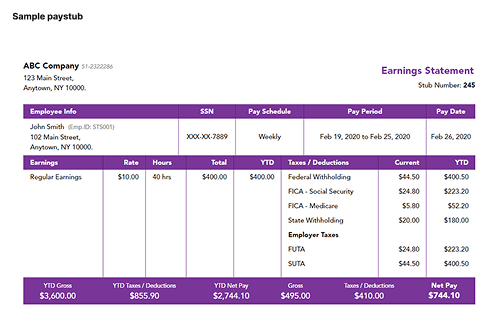
A pay stub is a document an employer provides with each paycheck to explain how an employee’s pay was calculated. It shows gross pay, taxes, deductions, net pay, the pay period, and year-to-date totals.
A pay stub may also be called an earnings statement, wage statement, paycheck stub, payslip, or payroll statement. Whether it is delivered on paper or through an online payroll system, its main purpose is to give employees a clear record of what they earned and what was taken out of their pay.
For example:
| Pay informationAmount | |
| Gross pay | $2,000 |
| Taxes and deductions | $450 |
| Net pay | $1,550 |
In this example, the employee earned $2,000 before deductions and received $1,550 as take-home pay.
What Information Appears on a Pay Stub?
A pay stub usually includes employee details, employer information, earnings, taxes, deductions, net pay, and year-to-date totals. The exact format may differ depending on the employer or payroll provider.
Common pay stub sections include:
- Employee name and address
- Employer name and contact information
- Employee identification number
- Pay period start and end dates
- Pay date
- Hourly rate or salary information
- Regular hours worked
- Overtime hours
- Gross earnings
- Federal income tax withholding
- State and local income tax withholding
- Social Security tax
- Medicare tax
- Health insurance deductions
- Retirement contributions
- Paid time off balances
- Net pay
- Year-to-date earnings and deductions
- Direct deposit information
Employees should review each section because even a small error in hours, pay rate, or tax withholding can affect take-home pay.
Why Do Employees Receive Pay Stubs?
Employees receive pay stubs so they can understand how their compensation was calculated. The document creates a record of earnings, deductions, taxes, benefits, and the final payment received.
A pay stub helps employees:
- Confirm that their hours were recorded correctly
- Verify their hourly wage or salary
- Check overtime calculations
- Review bonuses, tips, and commissions
- Understand payroll taxes
- Track health insurance and retirement deductions
- Confirm direct deposit amounts
- Compare current pay with year-to-date totals
- Identify payroll errors
- Provide proof of income
Pay stubs can also help when preparing taxes, applying for housing, requesting a loan, or reviewing employment benefits.
Is a Pay Stub the Same as a Paycheck?
A pay stub is not the same as a paycheck. A paycheck is the actual payment, while a pay stub explains how the payment amount was calculated.
Employees paid by direct deposit may not receive a physical paycheck at all. Instead, the money is transferred directly to their bank account, and the pay stub is provided electronically through a payroll portal.
The difference can be summarized as follows:
| DocumentPurpose | |
| Paycheck | Provides the employee’s payment |
| Pay stub | Explains earnings, deductions, taxes, and net pay |
| Bank deposit record | Confirms that money entered the employee’s account |
| W-2 form | Summarizes annual wages and tax withholding |
A pay stub covers one pay period, while a W-2 summarizes taxable wages and withholding for an entire calendar year.
What Is Gross Pay on a Pay Stub?
Gross pay is the total amount an employee earned before taxes and deductions were removed. It may include regular wages, overtime, bonuses, commissions, tips, and other taxable compensation.
For an hourly employee, gross pay is generally calculated by multiplying the hourly rate by the number of regular hours worked.
For example:
- Hourly rate: $20
- Regular hours: 40
- Regular gross pay: $800
If the employee also worked overtime, earned a bonus, or received a commission, those amounts would normally be added to gross earnings.
For salaried employees, gross pay is usually based on annual salary divided by the number of pay periods in the year.
An employee earning $52,000 per year and paid every two weeks would generally have 26 pay periods:
$52,000 divided by 26 = $2,000 in gross pay per pay period
What Is Net Pay on a Pay Stub?
Net pay is the amount an employee receives after taxes and deductions are subtracted from gross pay. It is also called take-home pay.
The basic calculation is:
Gross pay - taxes - deductions = net pay
For example:
| Pay calculationAmount | |
| Gross pay | $2,000 |
| Federal and state taxes | $300 |
| Social Security and Medicare | $153 |
| Benefits and retirement | $147 |
| Net pay | $1,400 |
Net pay can differ between employees who earn the same salary because their withholding elections, benefit plans, retirement contributions, and other deductions may be different.
Why Is Net Pay Lower Than Gross Pay?
Net pay is lower than gross pay because employers subtract required taxes and employee-authorized deductions before issuing payment.
Common reasons for the difference include:
- Federal income tax withholding
- State income tax withholding
- Local income tax withholding
- Social Security tax
- Medicare tax
- Health insurance premiums
- Dental and vision insurance
- Retirement plan contributions
- Flexible spending account contributions
- Health savings account contributions
- Wage garnishments
- Union dues
- Life insurance
- Other voluntary benefits
Some deductions reduce taxable income, while others are taken after taxes have already been calculated.
What Taxes Are Deducted From a Paycheck?
A pay stub may show federal income tax, state income tax, local income tax, Social Security tax, and Medicare tax. The exact deductions depend on the employee’s location, income, and withholding information.
Federal Income Tax Withholding
Federal income tax withholding is the amount an employer sends to the Internal Revenue Service on the employee’s behalf.
The amount withheld can depend on:
- Taxable wages
- Pay frequency
- Filing status
- Information entered on Form W-4
- Additional withholding requests
- Certain deductions and credits
Federal withholding is an advance payment toward the employee’s annual federal income tax liability.
Social Security Tax
Social Security tax is a payroll tax used to fund Social Security benefits. It may appear on a pay stub as Social Security, OASDI, FICA Social Security, or a similar label.
This deduction is separate from federal income tax withholding.
Medicare Tax
Medicare tax helps fund the federal Medicare program. It may appear as Medicare, FICA Medicare, or another similar abbreviation.
Employees with higher wages may also see additional Medicare-related withholding when applicable.
State and Local Income Tax
State and local income tax withholding depends on where the employee lives and works. Some employees may see both state and local tax deductions, while others may not see either one.
Remote employees should pay particular attention to state tax withholding. Working from a different state can affect which state has the right to tax the wages.
What Are Pre-Tax Deductions?
Pre-tax deductions are amounts removed from pay before certain taxes are calculated. These deductions can reduce the employee’s taxable income.
Common pre-tax deductions may include:
- Health insurance premiums
- Dental insurance
- Vision insurance
- Traditional 401(k) contributions
- Flexible spending account contributions
- Health savings account contributions
- Certain commuter benefits
For example, assume an employee earns $3,000 and contributes $200 to a qualifying pre-tax retirement or benefit plan. Depending on the deduction type, some payroll taxes may be calculated using $2,800 instead of the full $3,000.
Not every deduction receives the same tax treatment. Employees should review the deduction description and their benefit documents when they are unsure.
What Are Post-Tax Deductions?
Post-tax deductions are taken after applicable payroll taxes have been calculated. They usually do not reduce taxable income for the current pay period.
Examples can include:
- Roth retirement contributions
- Certain life insurance premiums
- Union dues
- Charitable contributions
- Wage garnishments
- Loan repayments
- After-tax benefit deductions
A pay stub may not clearly label every deduction as pre-tax or post-tax. Employees can ask their payroll or human resources department for clarification.
What Does Year-to-Date Mean on a Pay Stub?
Year-to-date, often shown as YTD, means the total amount recorded from the beginning of the calendar year through the current pay period.
A pay stub may show year-to-date totals for:
- Gross earnings
- Taxable wages
- Federal income tax
- State income tax
- Local income tax
- Social Security tax
- Medicare tax
- Retirement contributions
- Health insurance deductions
- Net pay
For example, an employee’s current gross pay may be $2,000 while year-to-date gross pay is $24,000. This means the employee has earned $24,000 during the calendar year so far.
Year-to-date totals help employees track annual income and compare payroll records with their W-2 forms.
How Are Hourly Pay and Overtime Shown?
Hourly pay is normally displayed using the employee’s hourly rate, number of hours worked, and total earnings for the pay period. Overtime is usually listed separately from regular hours.
A pay stub might show:
| Earnings typeHoursRateCurrent earnings | |||
| Regular pay | 40 | $20 | $800 |
| Overtime pay | 5 | $30 | $150 |
| Total gross pay | $950 |
Employees should confirm that:
- Regular hours match their time records
- Overtime hours are listed separately
- The correct overtime rate was used
- Unpaid leave was deducted correctly
- Paid time off was recorded properly
An error in even one of these areas can change gross pay and every deduction calculated from it.
How Are Bonuses, Tips, and Commissions Displayed?
Bonuses, tips, and commissions are usually listed as separate earning categories. Keeping these amounts separate helps employees understand how their total gross pay was calculated.
A sales employee’s pay stub may include:
- Base salary
- Sales commission
- Performance bonus
- Reimbursement
- Retroactive pay
- Regular gross earnings
Irregular payments can make one pay period appear much higher than another. This may also affect tax withholding because payroll systems may calculate withholding differently for supplemental wages.
Employees using pay stubs for income verification may need to explain irregular bonuses or commissions to a landlord, bank, or mortgage lender.
Can a Pay Stub Be Used as Proof of Income?
Yes, a pay stub is commonly used as proof of income because it shows recent earnings, employer details, pay frequency, deductions, and year-to-date income.
Pay stubs may be requested by:
- Landlords
- Property management companies
- Banks
- Mortgage lenders
- Auto lenders
- Personal loan providers
- Government agencies
- Insurance companies
- Accountants
- Immigration or legal professionals
The person reviewing the pay stub may look at:
- Employer name
- Employee name
- Gross pay
- Net pay
- Pay frequency
- Year-to-date earnings
- Employment consistency
- Bonus and commission amounts
The number of pay stubs requested can vary by landlord, lender, or organization. They may ask for several recent statements to confirm that income is stable.
Can a Pay Stub Verify Employment?
A pay stub can support employment verification because it shows an employer name, employee information, pay date, and recent earnings. However, some organizations may request additional documents.
Other employment verification documents can include:
- An employment verification letter
- A job offer letter
- A W-2 form
- Bank statements
- Tax returns
- A payroll verification report
- Direct contact with the employer
A pay stub alone may not confirm whether employment is still active, particularly when the document is old.
Can Self-Employed Workers Create Pay Stubs?
Self-employed workers can create income statements or pay stubs when they pay themselves through a business, but the document should accurately reflect real business and payment records.
A self-employed pay stub may include:
- Business name
- Worker or owner name
- Pay period
- Gross payment
- Business deductions
- Tax withholding, when applicable
- Net payment
- Year-to-date totals
Self-employed individuals may also need to provide bank statements, invoices, profit and loss statements, tax returns, or client contracts as proof of income.
Creating inaccurate or misleading pay documents can cause problems during income verification. Every figure should be supported by actual financial records.
How Can Employees Get Old Pay Stubs?
Employees can usually obtain old pay stubs through their payroll portal, human resources department, payroll department, or former employer.
The usual steps are:
- Sign in to the employer’s payroll system.
- Open the pay or earnings section.
- Select the relevant pay date.
- Download or print the statement.
- Contact payroll or human resources if the document is unavailable.
Former employees may need to contact their previous employer directly. They should provide identifying information carefully and confirm how the document will be delivered.
What Should You Do If a Pay Stub Is Incorrect?
An employee who finds an error should compare the pay stub with time records, employment terms, benefit elections, and previous payroll statements before contacting the employer.
Common payroll errors include:
- Missing work hours
- Incorrect hourly rate
- Missing overtime
- Duplicate deductions
- Incorrect benefit premiums
- Wrong state withholding
- Missing commission payments
- Incorrect paid time off
- Wrong year-to-date totals
- Incorrect direct deposit amount
Employees should report the issue to payroll or human resources and keep a written record of the request.
The message should identify:
- The affected pay period
- The incorrect amount
- The expected amount
- Supporting time records or documents
- The requested correction
When year-to-date totals do not match earlier pay stubs, employees should ask whether the payroll system made a prior-period adjustment.
How Can Employees Check a Pay Stub for Errors?
Employees can identify many payroll errors by reviewing the pay stub in the same order each payday.
A practical review process includes:
- Confirm the employee and employer information.
- Check the pay period and payment date.
- Compare hours with time records.
- Confirm the regular and overtime rates.
- Review bonuses, tips, and commissions.
- Check gross pay.
- Review every tax deduction.
- Confirm benefit and retirement deductions.
- Compare net pay with the bank deposit.
- Review year-to-date totals.
Comparing the current pay stub with the previous one can make unexpected changes easier to identify.
How Do Pay Stubs Compare With W-2 Forms?
Pay stubs show payroll details for individual pay periods, while a W-2 summarizes annual taxable wages and tax withholding.
The totals may not always look identical because gross earnings and taxable wages are not necessarily the same.
For example, certain pre-tax deductions may reduce the wages reported in a W-2 box even though the full earnings appear in year-to-date gross pay.
Employees should compare:
- Annual gross earnings
- Federal taxable wages
- Social Security wages
- Medicare wages
- Federal withholding
- State withholding
- Local withholding
- Retirement contributions
Small differences may have valid tax explanations. Large or unexplained differences should be discussed with payroll before filing a tax return.
How Long Should Employees Keep Pay Stubs?
Employees should keep pay stubs long enough to verify annual tax forms, income records, deductions, and employment history. Digital copies should be stored securely.
Pay stubs can be useful when:
- Reviewing a W-2
- Filing a tax return
- Applying for a mortgage
- Documenting retirement contributions
- Resolving a payroll dispute
- Confirming paid time off
- Proving employment history
- Applying for benefits
Employees should avoid storing unprotected pay stubs on shared devices because these documents can contain personal and financial information.
How Can Pay Stubs Be Shared Safely?
Pay stubs should be shared only through secure methods because they can contain addresses, employee numbers, bank information, tax details, and other sensitive data.
Before sharing a pay stub, employees should consider removing or hiding:
- Social Security numbers
- Bank account numbers
- Employee identification numbers
- Home addresses
- Unnecessary deduction details
- Direct deposit information
The recipient should receive only the information needed for income or employment verification.
Final Summary
A pay stub is an earnings statement that explains how an employee’s paycheck was calculated. It shows gross pay, taxes, deductions, net pay, and year-to-date totals.
Employees can use pay stubs to check hours, overtime, pay rates, commissions, taxes, retirement contributions, health insurance costs, and direct deposit amounts. They are also commonly used as proof of income for apartments, loans, mortgages, and other financial applications.
The most important figures to understand are:
- Gross pay, which is earnings before deductions
- Net pay, which is the employee’s take-home pay
- Taxes and deductions, which explain the difference
- Year-to-date totals, which track annual amounts
- Pay period details, which show when the income was earned
Reviewing every pay stub can help employees identify errors early, understand their compensation, and maintain accurate income records.

Alexander Caldwell – Financial Expert
Alexander Caldwell is a financial expert specializing in payroll management, with over 12 years of experience in the industry. He earned his bachelor's degree in finance from the University of California, Berkeley. Throughout his career, Alexander has worked with businesses of all sizes, helping them streamline payroll processes and ensure compliance with tax regulations. At Online Pay Stub, he is dedicated to providing accurate and reliable payroll solutions, making it easier for employees and businesses to manage their financial records efficiently.


Comments (0)
Loading comments...

