
How to Make Pay Stub A Step-by-Step Guide (2026)
Wednesday, Jul 29, 2026
· by Alexander Caldwell – Financial Expert
You can make a pay stub by entering accurate company, employee, and salary information, calculating gross pay, listing taxes and deductions, reviewing the document, and downloading the completed pay stub.
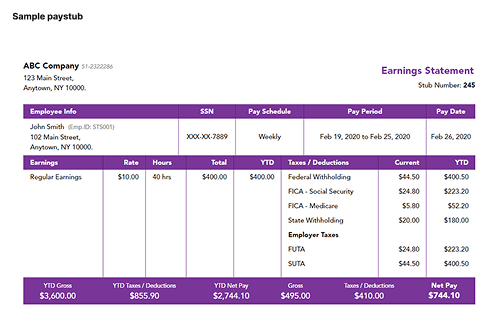
A pay stub should always reflect real payroll records. It explains how an employee’s gross earnings became net pay and provides a clear record of wages, taxes, benefits, deductions, and year-to-date totals.
With Online PayStub, the process can be completed in three main stages:
- Enter Company Information.
- Enter Employee Information.
- Enter Salary Information.
After entering the required details, you can preview the pay stub, correct any mistakes, and download the completed document as a secure PDF.
What Information Do You Need to Make a Pay Stub?
You need accurate employer, employee, payment, earnings, tax, deduction, and year-to-date information to create a professional pay stub.
Gathering everything before beginning makes the process faster and reduces payroll errors.
Company Information
The company section identifies the employer issuing the payment.
It normally includes:
- Company name
- Company address
- Employer identification number, when applicable
- Business contact details
- Company logo, when supported
The information should match the employer’s official business and payroll records.
Employee Information
The employee section identifies the person receiving the wages.
It can include:
- Employee’s full name
- Employee identification number
- Employee address
- Job title or department
- Last four digits of the Social Security number, when needed
- Employment status
- Work location
Avoid displaying a complete Social Security number or full bank account number on a pay stub. Electronic payroll documents should contain only the personal information needed for identification and payroll reporting.
Salary Information
The salary section explains when and how the employee was paid.
It normally includes:
- Pay-period start date
- Pay-period end date
- Payment date
- Pay frequency
- Hourly rate or salary
- Regular hours
- Overtime hours
- Bonuses
- Commissions
- Tips
- Paid time off
- Other taxable earnings
This information is used to calculate gross pay before taxes and deductions.
Taxes and Deductions
A pay stub should separately list each tax and deduction applied during the pay period.
Common items include:
- Federal income tax
- Social Security tax
- Medicare tax
- State income tax
- Local income tax
- Health insurance
- Dental and vision insurance
- Retirement contributions
- Wage garnishments
- Union dues
- Other authorized deductions
The deductions should come from real payroll records rather than estimated or invented amounts.
How to Make Pay Stubs With Online PayStub
Online PayStub lets you create a pay stub by entering company, employee, and salary information into an online form, previewing the results, and downloading the finished PDF.
The process is designed around three main information sections.
Step 1: Enter Company Information
Begin by entering the business information that should appear at the top of the pay stub.
This section establishes which employer issued the payment. Enter the official company name and address exactly as they appear in payroll and business records.
Check the following details before continuing:
- Correct legal or operating business name
- Complete business address
- Correct city, state, and ZIP code
- Employer identification details, when required
- Business contact information
Using consistent employer information makes the pay stub easier to compare with employment records, tax forms, and other payroll documents.
Step 2: Enter Employee Information
Next, enter the identifying details of the employee receiving the payment.
The employee name should match the company’s payroll records. Add the employee identification number and address when requested.
Review this section carefully because errors in an employee’s name or identification details can create problems when the pay stub is used as proof of income.
You may need to enter:
- Employee name
- Employee ID
- Employee address
- Employment location
- Job title
- Filing or withholding information
Only use accurate information for an actual employee. A pay stub should not be created to misrepresent employment, wages, or income.
Step 3: Enter Salary Information
Enter the employee’s pay rate, hours, pay period, and additional earnings to calculate the payment shown on the stub.
This section may include:
- Hourly or salaried payment type
- Hourly rate
- Annual salary
- Regular hours worked
- Overtime hours
- Pay frequency
- Pay-period dates
- Pay date
- Bonus or commission
- Tips
- Additional earnings
- Taxes and deductions
After entering the salary information, confirm that gross pay, deductions, and net pay match the underlying payroll records.
Step 4: Preview the Pay Stub
Preview the pay stub before completing the order so you can identify and correct inaccurate information.
The preview should be checked against time records, payroll calculations, benefit elections, and the employee’s withholding information.
Review:
- Company name and address
- Employee name and ID
- Pay period
- Payment date
- Hourly rate or salary
- Regular and overtime hours
- Gross pay
- Taxes
- Benefit deductions
- Net pay
- Year-to-date amounts
A polished design does not make a pay stub accurate. The figures and employee information must still be supported by real records.
Step 5: Download the Completed Pay Stub
After reviewing the document, download the completed pay stub as a secure PDF.
The PDF can be:
- Saved to a secure payroll folder
- Printed for the employee
- Delivered electronically
- Attached to an employee payroll account
- Retained with other payroll records
Online PayStub also provides options for downloading and printing completed documents. Electronic files should be protected against unauthorized access because pay stubs can contain sensitive personal and financial information.
How Do You Calculate Gross Pay?
Gross pay is calculated by adding all compensation earned before taxes and deductions.
The calculation differs for hourly and salaried employees.
Gross Pay for Hourly Employees
For an hourly employee, multiply regular hours by the hourly rate.
Regular hours × hourly rate = regular earnings
For example:
- Regular hours: 40
- Hourly rate: $20
- Regular earnings: $800
If the employee also earned $150 in overtime:
- Regular earnings: $800
- Overtime earnings: $150
- Gross pay: $950
Bonuses, commissions, tips, retroactive wages, and other taxable compensation should also be added when applicable.
Gross Pay for Salaried Employees
For a salaried employee, divide the annual salary by the number of annual pay periods.
Annual salary ÷ annual pay periods = gross pay per period
For example, an employee earns $52,000 per year and is paid every two weeks.
- Annual salary: $52,000
- Annual pay periods: 26
- Gross pay per period: $2,000
Use the employer’s actual payroll schedule. Biweekly payroll normally has 26 pay periods, while semimonthly payroll normally has 24.
How Do You Calculate Overtime on a Pay Stub?
Overtime pay is normally calculated by multiplying eligible overtime hours by the employee’s applicable overtime rate.
For covered nonexempt employees, federal law generally requires overtime compensation of at least one and one-half times the regular rate for hours worked beyond 40 in a workweek. State laws or employment agreements can provide additional requirements.
Example:
- Regular rate: $20
- Overtime rate: $30
- Overtime hours: 5
- Overtime earnings: $150
The pay stub should list regular and overtime earnings separately:
| EarningsHoursRateAmount | |||
| Regular pay | 40 | $20 | $800 |
| Overtime pay | 5 | $30 | $150 |
| Gross pay | $950 |
When an employee works at multiple hourly rates, each rate and the related hours should be listed separately.
How Do You Calculate Taxes for a Pay Stub?
Payroll taxes should be calculated using the employee’s withholding information and the current federal, state, and local payroll rules.
Federal income tax withholding is not calculated using one fixed percentage for every employee. Employers generally use the employee’s Form W-4, pay frequency, taxable wages, filing information, credits, deductions, and the current IRS withholding methods. The IRS publishes the applicable wage bracket and percentage methods in Publication 15-T.
For 2026, the employee Social Security tax rate is 6.2% on covered wages up to the annual wage base, while the Medicare rate is 1.45% on covered wages without a general wage base limit. Employers normally withhold the employee share and pay a matching employer share. Additional Medicare tax withholding can apply after wages paid by one employer exceed the federal threshold.
State and local withholding depends on:
- Where the employee lives
- Where the employee performs the work
- State withholding forms
- Local income tax rules
- Reciprocal state agreements
- Remote and hybrid work arrangements
A pay stub generator can organize payroll information, but the employer remains responsible for using correct withholding data.
What Is the Difference Between Pre-Tax and Post-Tax Deductions?
Pre-tax deductions are generally removed before certain taxes are calculated, while post-tax deductions are removed after applicable taxes have been calculated.
Common Pre-Tax Deductions
Depending on the plan, pre-tax deductions can include:
- Health insurance
- Dental insurance
- Vision insurance
- Traditional 401(k) contributions
- Health savings account contributions
- Flexible spending account contributions
- Qualifying commuter benefits
Common Post-Tax Deductions
Post-tax deductions can include:
- Roth retirement contributions
- Certain life insurance premiums
- Union dues
- Charitable contributions
- Wage garnishments
- Employee loan repayments
- Other after-tax benefits
Each deduction should be entered using its correct payroll tax treatment. Classifying a deduction incorrectly can affect taxable wages, withholding, and net pay.
How Do You Calculate Net Pay?
Net pay is calculated by subtracting all employee taxes and deductions from gross pay.
Gross pay - taxes - deductions = net pay
Example:
| DescriptionAmount | |
| Gross pay | $950 |
| Federal and payroll taxes | -$180 |
| Health insurance | -$50 |
| Retirement contribution | -$30 |
| Net pay | $690 |
These amounts are illustrative. Actual withholding depends on the employee’s circumstances and current tax rules.
Net pay should match the amount paid by check, direct deposit, cash, or another recorded payment method.
How Do You Add Year-to-Date Totals?
Year-to-date totals are calculated by adding the current payroll amounts to all previous payroll amounts from January 1 through the current payment date.
A pay stub should commonly track year-to-date totals for:
- Gross earnings
- Taxable wages
- Federal income tax
- Social Security tax
- Medicare tax
- State and local taxes
- Benefit deductions
- Retirement contributions
- Net pay
For example:
| CategoryPrevious YTDCurrentNew YTD | |||
| Gross earnings | $18,000 | $2,000 | $20,000 |
| Federal tax | $2,200 | $250 | $2,450 |
| Retirement | $900 | $100 | $1,000 |
| Net pay | $13,500 | $1,500 | $15,000 |
When switching payroll systems, enter prior payroll totals before creating the first pay stub in the new system. Otherwise, the year-to-date values may restart incorrectly.
How Should Special Payments Appear?
Special payments should be listed separately so employees can see exactly how gross pay was calculated.
Bonuses and Commissions
Bonuses and commissions should have their own earning lines rather than being combined with regular wages.
The pay stub can show:
- Regular salary
- Sales commission
- Performance bonus
- Referral bonus
- Other incentive pay
The period in which a commission was earned can differ from the period in which it was paid. Payroll records should document both when needed.
Tips
Cash and reported credit-card tips should be recorded according to the employer’s payroll and tip-reporting process.
Tips can affect federal income tax, Social Security tax, and Medicare tax. Employers must collect applicable employee payroll taxes on reported tips, subject to the federal rules.
Retroactive Wages
Retroactive pay should be displayed as a separate earning category with a clear description.
For example:
- Retroactive regular pay
- Retroactive overtime
- Prior-period wage adjustment
The corrected amount should also be included in gross pay and year-to-date totals.
Reimbursements
Expense reimbursements should be separated from wages. Taxable reimbursements may need to be included in taxable compensation, while qualifying accountable-plan reimbursements can receive different treatment.
Paid and Unpaid Leave
Paid vacation, sick leave, and other paid time off can be listed separately from regular worked hours.
Unpaid leave normally reduces the employee’s earnings rather than appearing as a standard deduction. The calculation must follow wage, salary, and employment rules applying to the employee.
Can You Make Pay Stubs Without Payroll Software?
You can make pay stubs manually with a spreadsheet or document template, but every calculation and year-to-date total must still be accurate.
Manual methods may be practical for a business with very few employees, but they increase the risk of:
- Incorrect tax calculations
- Missing deductions
- Overtime errors
- Inaccurate year-to-date totals
- Duplicate payments
- Formatting inconsistencies
- Payroll record mismatches
An online pay stub creator simplifies document formatting and calculations. The information entered must still come from actual payroll records.
Can Pay Stubs Be Delivered Electronically?
Pay stubs can often be delivered electronically, but employers must review the pay-statement and electronic-delivery laws that apply in the employee’s state.
The federal Fair Labor Standards Act requires covered employers to maintain accurate records of employee wages and hours, but it does not itself require employers to provide workers with pay stubs. State laws can impose separate pay-statement requirements, including rules about required information and electronic access.
Electronic pay stubs should be:
- Accessible to the employee
- Stored securely
- Protected with appropriate account controls
- Available in a printable format
- Retained according to applicable recordkeeping rules
How Long Should Employers Keep Pay Stub Records?
Employers should keep payroll records for the periods required by federal and state law, with longer retention when needed for tax, audit, benefit, or dispute purposes.
Under the FLSA, covered employers generally must retain payroll records for at least three years. Records supporting wage calculations, such as timecards, wage-rate tables, schedules, and records of additions or deductions, generally must be kept for two years.
The IRS generally requires employment tax records to be kept for at least four years after the tax becomes due or is paid, whichever is later. These records include wage payments, employee information, withholding certificates, tax deposits, filed returns, benefits, and reimbursements.
State laws, benefit programs, contracts, insurance requirements, or active disputes may require longer retention.
Are Homemade Pay Stubs Legal?
A pay stub created with an online form, spreadsheet, accounting program, or payroll system can be valid when it accurately reflects a real payment and complies with applicable laws.
The document should be supported by:
- Time records
- Salary agreements
- Payroll calculations
- Tax withholding records
- Benefit elections
- Bank or check records
- Accounting entries
- Payroll tax filings
Creating a pay stub with false employer, income, tax, or employment information can be considered misrepresentation or fraud. A pay stub generator should be used to document legitimate payroll, not to manufacture unsupported proof of income.
Can Independent Contractors Receive Pay Stubs?
Independent contractors are normally paid as nonemployees and usually receive payment records, invoices, and Form 1099-NEC rather than employee pay stubs.
Worker classification depends on the actual relationship, including behavioral control, financial control, and the relationship between the parties. A contract or payment label alone does not determine whether a worker is an employee or contractor.
Businesses that pay reportable nonemployee compensation generally use Form 1099-NEC rather than Form W-2. Employees, by contrast, are normally paid through payroll with applicable tax withholding.
An S corporation owner who performs services for the corporation may need to be treated as an employee and paid through payroll. The business should obtain professional tax guidance before creating owner pay stubs.
How Do You Correct an Inaccurate Pay Stub?
Correct an inaccurate pay stub by fixing the underlying payroll record, recalculating the affected amounts, and issuing a clearly identified corrected statement.
The corrected pay stub should:
- Reference the affected pay period.
- Show the corrected earnings or deduction.
- Update net pay when necessary.
- Update year-to-date totals.
- Identify the statement as corrected.
- Preserve the original payroll record.
- Document any additional payment or recovery.
Do not simply change the PDF without correcting the payroll ledger, tax records, and related filings.
Final Checklist for Creating a Pay Stub
A complete pay stub should show how gross earnings became net pay and should match the employer’s payroll records.
Before downloading the pay stub, confirm:
- Company information is correct.
- Employee information is accurate.
- Pay-period dates are correct.
- Regular and overtime hours match time records.
- Hourly rate or salary is correct.
- Bonuses, commissions, and tips are included.
- Gross pay is calculated correctly.
- Federal, state, and local taxes are accurate.
- Benefits and retirement deductions are itemized.
- Net pay matches the actual payment.
- Year-to-date totals include prior payroll.
- Sensitive information is protected.
- The document has been previewed before downloading.
To make a pay stub, gather accurate company, employee, and salary information, calculate gross earnings, subtract taxes and deductions, add year-to-date totals, and review the completed statement.
Online PayStub simplifies the document creation process into three main information sections:
- Company Information
- Employee Information
- Salary Information
After completing these sections, preview the document, correct any mistakes, and download the secure PDF.
The tool makes the document easier to prepare, but the employer remains responsible for using accurate payroll records, current withholding information, and applicable federal and state rules.

Alexander Caldwell – Financial Expert
Alexander Caldwell is a financial expert specializing in payroll management, with over 12 years of experience in the industry. He earned his bachelor's degree in finance from the University of California, Berkeley. Throughout his career, Alexander has worked with businesses of all sizes, helping them streamline payroll processes and ensure compliance with tax regulations. At Online Pay Stub, he is dedicated to providing accurate and reliable payroll solutions, making it easier for employees and businesses to manage their financial records efficiently.


Comments (0)
Loading comments...

